viagogo Tickets
- 4.2
- Rating
- 1.00M
- Installs
- Free
- Price

 Analysis by App-foxy
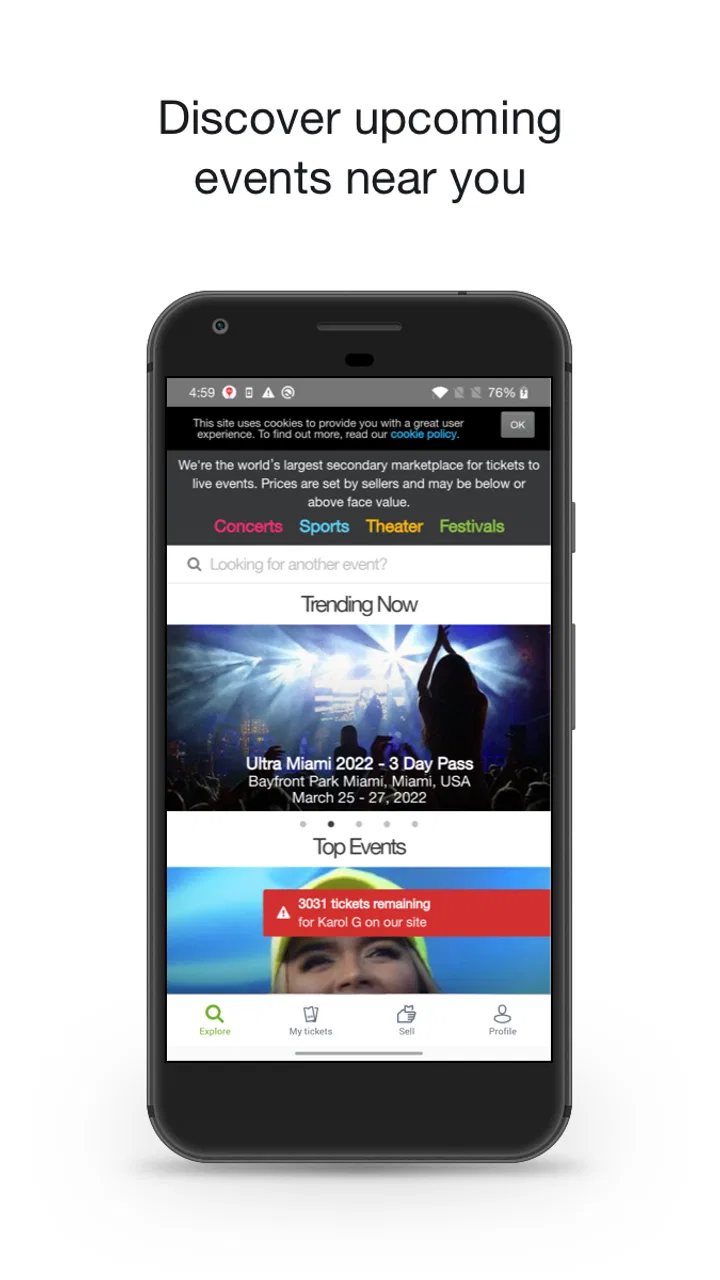
Buying tickets on a phone can be wonderfully convenient right up until a popular event starts selling quickly, several dates look similar, or the cheapest result turns out not to be the most useful one. I spent time using viagogo Tickets as an event-search and ticket-buying app, and my main takeaway is simple: it is most helpful when you treat it as a marketplace for comparing available listings, not as a magic shortcut to every ticket at the lowest possible cost.
The app is free to install, aimed at Everyone, and developed by Viagogo. It belongs to the Events category and has built a sizeable audience, with over one million installs and an average rating of 4.1 from around 6,800 ratings. Those figures suggest a service people return to when they are looking for concerts, sports, theatre, and other live experiences, but they do not remove the need to read each listing carefully.
How I use viagogo Tickets from search to checkout
My usual workflow begins with the event rather than the app itself. I search for the performer, team, show, or venue, then pause before selecting the first attractive result. Event names can be similar, and a tour may have several dates in nearby cities. Checking the location and date at this stage prevents the most frustrating kind of mistake: completing a purchase for an event that looked right in a quick glance but does not fit my plans.
You May Also Like

 AccuWeather: Weather Radar
AccuWeather Review: A Quick, Clear Forecast for Everyday Decisions
For everyday plans, the best forecast is the one you can understand quickly. AccuWeather makes rain timing, radar, and local conditions easy to act on, with a few trade-offs.

 Hill Climb Racing
Why Hill Climb Racing Still Turns Crashes Into One More Run
A tiny car, a bumpy hill and one more upgrade: Hill Climb Racing keeps resurfacing because its simple chaos makes every near-miss feel personal.

 AliExpress - Shopping App
AliExpress Makes Global Shopping Feel Personal, but Shoppers Bear the Risk
AliExpress turns a global marketplace into a pocket-sized discovery engine. Its reach is useful, its shopping loop compelling, and its trade-offs easy to miss.

 Lords Mobile: Kingdom Wars
Lords Mobile Is a Kingdom-Building Routine, Not a Quick Match
A case-by-case verdict on the building, battles, device demands, and social commitments that make Lords Mobile rewarding for some players and exhausting for others.

 PDF Scanner app - TapScanner
TapScanner Makes Paperwork Easier to Capture, Check, and Share
TapScanner makes scanning with a phone feel less like a rescue operation and more like a dependable step in getting work done. Its capture tools are useful, though not flawless.

 Block Blast!
 Shows How Much a Puzzle Game Can Leave Out
A quiet grid game shows why puzzle players increasingly value instant clarity, repeatable skill and low-pressure play—and where the genre still needs to catch up.
More From Our News Desk
View All News


Once I open an event, I compare the available listings instead of assuming the first one is the best choice. I look at the section, row information when it is shown, ticket quantity, and any notes attached to the listing. For a group, quantity matters just as much as the headline price. Two seats together may be more valuable than a slightly cheaper pair separated across the venue, while a solo visitor may have more flexibility.
The map is useful as a starting point, but I would not rely on color alone. A highlighted area can tell me where a listing sits in the venue, yet the practical view may depend on the stage setup, the sport, or the layout used for that particular event. I use the map to narrow my search, then read the listing details and compare alternatives before moving forward.
A realistic example is a last-minute weekend concert. I might open the app on a train, search the artist, and find several listings that appear affordable. Rather than choosing immediately, I would first filter my thinking by travel time, seat location, and whether I need two tickets together. If the event is in another city, a cheaper seat may stop being a bargain once transport and accommodation are considered. The app can help me find tickets, but it cannot make the wider trip economical.
At checkout, I slow down again. I review the event, date, ticket count, seating description, and the final amount shown before confirming. Marketplace purchases are not the same as buying directly from a venue box office, so I want to understand exactly what I am selecting. If I am buying for someone else, I also make sure the recipient’s name, email details, and delivery expectations are correct before completing the order.
My most important habit is to judge the complete purchase, not the first visible number. A listing that looks inexpensive in a search view may not remain the most attractive after all applicable charges and delivery details are displayed. I compare the final total between a few suitable listings, not just the initial figures shown on the event page.
What the app is genuinely good at
The strongest part of the experience is breadth. viagogo Tickets is useful when the official seller is sold out, when I want to compare different seating areas, or when I am searching across several dates and venues. Instead of checking numerous individual event pages one by one, I can begin with a single app and get a broader view of what is available in the marketplace.
That makes it particularly practical for flexible buyers. If I care more about seeing a team play than sitting in a precise block, or if I can attend either of two evenings, the wider choice becomes meaningful. I can compare compromises: a better location on one date, a less convenient date with more suitable seats, or a listing that works better for a group.
It is less compelling when I already know the exact official ticket release and can buy directly from the venue or organizer. Direct sales may be simpler for someone who wants the original purchase route, clear face-value comparison, and fewer marketplace decisions. I see viagogo Tickets as an additional route, especially for availability and comparison, rather than an automatic replacement for official channels.
Settings and details worth checking before browsing seriously
The app’s current version is 104.5.3, and it requires operating system version 10 or later. That requirement is worth checking before planning around the app, particularly if the phone is older or has not been updated for some time. A smooth ticket search is not much help if the device cannot run the current release reliably.
I also pay attention to account and notification choices. If I am actively watching an event, notifications can be useful for reminders or changes that matter to my search, but I do not leave every alert enabled by habit. A focused setup makes it easier to notice something relevant without turning the app into background noise. I review notification permissions in the phone’s settings as well as any controls offered inside the app.
Location access deserves a deliberate decision. An event marketplace can still be useful when I search by artist, venue, or city manually, so I prefer not to grant more access than I need. If location-based discovery is convenient for a particular trip, I can enable it temporarily and then revisit the permission later. This is not about making the app unusable; it is about keeping the search intentional.
I prepare payment and contact information before I start chasing a time-sensitive listing. That does not guarantee a ticket, but it reduces avoidable pauses during checkout. I also keep the confirmation email and order details easy to find. For an event several weeks away, I would not depend on memory alone; I save the relevant information somewhere I can access it without reopening the entire search.
Another useful setting-related habit is keeping the app and phone current before an important purchase. Updates can change the interface, so I avoid experimenting with a new version for the first time during a frantic sale. The app was released on May 14, 2015, and its continued development means the experience can evolve; I treat the version shown on my device as the interface that matters, not an old screenshot or remembered layout.
Faster patterns for repeat searches
Experienced use is less about tapping quickly and more about reducing repeated decisions. I decide my non-negotiables before searching: event date, city, number of tickets, whether seats must be together, and the maximum total I am comfortable paying. With those boundaries set, I can dismiss unsuitable listings quickly instead of becoming attached to a low headline price.
For recurring sports fixtures or a tour with several dates, I search by the exact event and then compare nearby options in one session. I note which venues have acceptable travel times and which seating areas match my needs. This prevents me from restarting the same broad search every time I reconsider the purchase.
When I am buying for a group, I first search for the required quantity, then inspect whether the seats are together. I do not assume that selecting a number automatically means one block. If the group can split into pairs, I compare that arrangement with a single listing for everyone. The trade-off is obvious but easy to overlook when the app presents many choices: convenience and togetherness can cost more than simply buying the cheapest individual tickets.
For a solo attendee, I use flexibility differently. I check single-seat listings and less central sections rather than filtering myself into a narrow, expensive corner of the venue. A solo buyer may find a better balance by accepting a seat that would be difficult to place beside another ticket. That is one of the situations where knowing the audience matters more than chasing a universal “best” listing.
I also take screenshots or notes of the listing details before leaving the comparison screen, especially when I am discussing options with friends. I do not treat a screenshot as proof of a final order, but it helps the group compare the same section, date, and quantity rather than relying on vague descriptions in a chat. Once an order is complete, I keep the confirmation separately from those temporary comparison notes.
Another efficient pattern is to search at a calm moment, even if the event is not urgent. I can learn how the venue is divided, identify realistic sections, and understand the range of available choices before I am under pressure. Then, if I decide to buy later, I already know what compromises I am willing to make. This is more reliable than opening the app for the first time minutes before an event.
Where the marketplace model requires caution
The biggest limitation is that choice creates work. A large selection sounds ideal, but it also means that I must compare listings, read conditions, and check the final purchase details. Someone who wants a simple “one price, one seat, done” experience may find an official venue seller easier to understand.
Price comparison is another area where I stay disciplined. I never judge value from the starting amount alone. The final cost, seat location, quantity, and timing all belong in the decision. A ticket with an attractive initial figure can become less attractive when the complete checkout total is shown, while a more expensive listing may offer a location or arrangement that better fits the occasion.
I am also careful with event changes. If a date, venue, or schedule matters to me, I keep the order information accessible and watch for relevant communication. I do not build a non-refundable weekend around a ticket until I have checked the event details and understood the practical arrangements. The app is a buying tool; it is not a substitute for planning the journey or checking the venue’s own instructions.
Delivery and ticket format deserve attention too. I read how the tickets are expected to arrive and make sure the email account or device I use will be available when needed. For a group purchase, I decide in advance who will hold the tickets and how they will be shared. This small step avoids confusion at the entrance, particularly when several people assume someone else has the access details.
Privacy-conscious users should review permissions and account information rather than accepting every prompt automatically. Ticket buying naturally requires contact and payment details, but that does not mean every optional permission is essential. I prefer a clear, minimal setup and keep records of the order in my own secure places rather than relying solely on an app notification.
There is also a practical emotional limit. When an event feels urgent, scarcity can push me toward a rushed decision. I set my budget and seating boundaries before opening the listings. If every suitable option exceeds them, I would rather skip the purchase than let excitement turn a leisure expense into a regret. That restraint is part of using the app well.
Who should use it, and who should choose another route?
I would recommend viagogo Tickets to people who value discovery and comparison: fans looking across several events, travelers trying to find a workable date, and buyers who need to investigate availability after an official channel no longer fits their plans. Its free access and broad event focus make it easy to begin a search without committing to one venue or organizer.
I would be more cautious recommending it to someone who only wants the official seller, has a strict face-value budget, or dislikes comparing marketplace listings. That person may be happier starting with the venue, team, artist, or organizer’s own ticketing route. The best choice depends on whether availability and variety matter more than a straightforward direct purchase.
It is also not the right tool for someone using an older phone that cannot meet the operating-system requirement. In that case, a mobile browser or the official event channel may be more practical. I would not upgrade a device solely for this app unless ticket access is a recurring need.
The Everyone age rating makes the app broadly accessible, but younger users should still involve a responsible adult when handling payment, travel, and event decisions. The age label describes the app’s audience, not whether every ticket purchase is suitable for every person or every event.
My verdict after building a repeatable routine
After using it as a regular search tool rather than a one-tap bargain finder, I find viagogo Tickets most valuable for widening the starting point. It brings many event possibilities into one mobile workflow and gives me room to compare dates, sections, quantities, and practical compromises. The experience becomes much better when I arrive with a plan instead of browsing without limits.
My recommended routine is straightforward: confirm the event and date, define the number of tickets and seating needs, compare several complete listings, review the final total, and save the order details immediately. I would also check the phone requirement, adjust notifications and permissions to suit my habits, and keep an official seller in the comparison whenever that route is available.
The app is free, has a 4.1 average rating, and has been part of the Events category since its 2015 release, but those facts are less important than the way it fits your buying style. If you want a broad marketplace and can handle careful comparison, it can be genuinely useful. If you want the simplest direct transaction with minimal interpretation, start elsewhere and use this app only when its wider selection solves a real problem.
My final opinion is positive but measured: the best results come from using the app as a research-and-comparison workspace, then making a deliberate purchase. It rewards flexible buyers who read closely and plan ahead. It is less suitable for anyone who treats the first low-looking price as the final answer.
FAQs for viagogo Tickets
01What is viagogo Tickets, and how does it work?
Viagogo Tickets is a platform that allows users to buy and sell tickets for live events worldwide, including concerts, sports, and theatre. It acts as a marketplace where sellers list tickets, and buyers can purchase them directly through the app, ensuring a secure transaction and delivery.
02Is viagogo Tickets safe to use for purchasing tickets?
Yes, viagogo implements secure payment methods and guarantees ticket authenticity. They offer customer support to handle issues such as ticket delivery or event cancellations. However, as a secondary market, prices can vary, so it's advisable to compare prices and verify event details before purchasing.
03Can I sell my tickets on viagogo, and what are the fees involved?
Yes, you can sell tickets on viagogo by listing them through the app. The platform charges a service fee on each sale, which is deducted from the ticket price. The exact fee percentage can vary, so it's important to review the terms before listing your tickets.
04How does viagogo handle ticket delivery and event cancellations?
Viagogo provides various delivery methods, including e-tickets and physical delivery. In case of event cancellations, their policy typically involves refunds or providing alternative options. It's crucial to read their cancellation policy and stay updated through the app for any event changes.
05What should I do if I encounter issues with my viagogo purchase?
If you face any issues, such as receiving incorrect tickets or delivery problems, contact viagogo customer support immediately. They offer assistance through their app and website to resolve disputes and ensure customer satisfaction. Keeping records of all transactions can help in resolving issues efficiently.
Pros
- Wide range of event tickets available.
- User-friendly interface with easy navigation.
- Secure payment options ensure safe transactions.
- Mobile app for on-the-go ticket purchases.
- Customer support is responsive and helpful.
Cons
- Service fees can be quite high.
- Tickets may be overpriced by resellers.
- Limited refund options for canceled events.
- Some users report delayed ticket delivery.
- App may occasionally have performance issues.

viagogo Tickets
Gallery